QA Image Diff
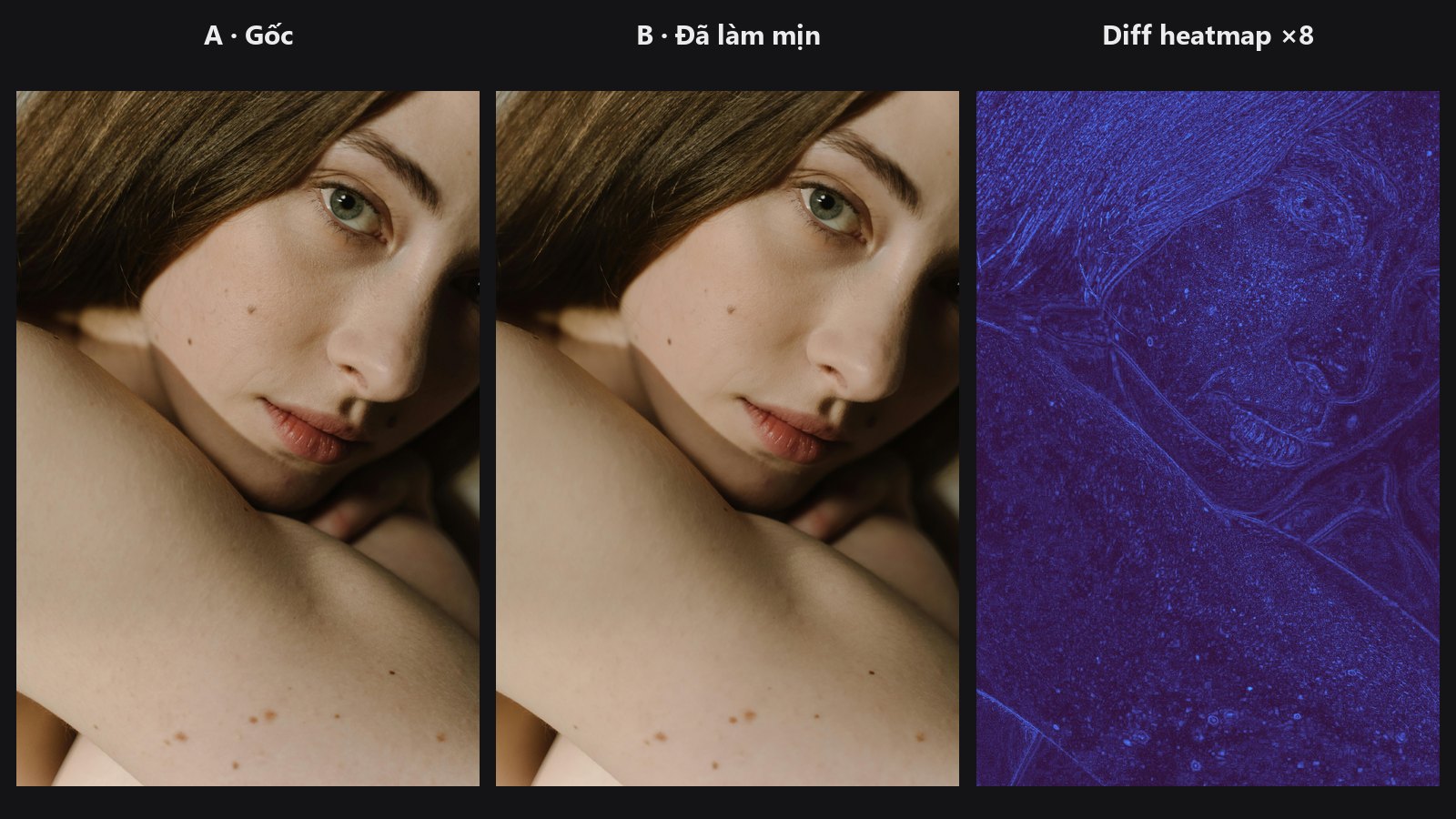
Put your before and after side by side for the computer. It draws a map of what changed and gives you numbers, so you can check that a retouch only touched what you meant it to.
| In ComfyUI | Add Node → ComfyUI-JH-PixelPro → qa → QA: Image Diff (SSIM/PSNR) |
| Good for | Checking where a retouch changed pixels, comparing two settings or pipelines, verifying an edit stayed inside a mask |
When to use it
Our eyes miss subtle changes. This node measures them:
- Diff image: shows where the two images differ. Bright means a bigger change.
- SSIM (structural similarity): from about 0 to 1. 1 means identical structure. It reacts to changes in texture and edges more than to a small overall brightness shift.
- PSNR (in dB): higher means closer. Identical images give the cap, 100 dB.
- Report: JSON with
ssim,psnr,mae(average absolute difference, 0 to 1),max_abs(largest single difference) andchanged_pct(percentage of pixels that moved by more than 1/255).
Use it to prove that a frequency-separation or smoothing pass left the eyes and hair untouched, or to see exactly which areas a new setting changes.
Quick start
- Connect the original to
image_aand the retouched version toimage_b. Both must have the same width and height. - Leave
diff_modeonheatmapandamplifyon 4. - Connect
diffto aPreview Imagenode. Connectreportto a text preview node to read the numbers. - Optionally connect a mask to measure only one area.
Settings
| Setting | Default | What it does | Tip |
|---|---|---|---|
diff_mode |
heatmap |
heatmap is a colour map of the strongest channel difference. abs is the per-channel absolute difference. ssim_map shows where the structure changed (bright = changed). |
Start with heatmap. |
amplify |
4.0 | Gain applied to the difference so small changes show up. Not used by ssim_map. |
1 to 100. Raise it to reveal subtle edits. |
window_size |
11 | Size of the SSIM window (odd number). Larger = judges coarser structure. | 3 to 31. Reduced automatically on small images. |
mask (optional) |
none | Restricts all the numbers to this region, weighted by the mask. | The diff picture itself is not masked. |
Outputs: diff (IMAGE), ssim (FLOAT), psnr (FLOAT), report (STRING).
Batches
The ssim and psnr outputs refer to the first image of a batch only. The report lists every item.
Tips from retouching
- A very high
amplifymakes tiny rounding differences light up. Compare against the numbers, not only the picture. - Compare against the mask you used for the edit. If
changed_pctinside the mask is high but outside is near zero, the edit stayed in place. - If the mask is entirely black, the numbers return neutral values (SSIM 1, PSNR 100, others 0).
- Use
ssim_mapto ignore uniform brightness shifts and spot only structural changes.
Under the hood
SSIM is computed with kornia.metrics.ssim over the chosen window and averaged over channels. PSNR is -10 log10(MSE), capped at 100 dB. heatmap applies the Kornia turbo colormap to the maximum channel difference times amplify. With a mask, every metric becomes a mask-weighted mean. Images must match in size (there is no automatic resize); a batch of 1 is broadcast. Source: core/qa_diff.py.
Related nodes
- Mask Preview for checking masks visually
- Smart Sharpen and Skin Smoother, typical edits to check
- Frequency Separation for edits where a before/after check pays off
Example workflow
QA Image Diff example workflow. Copy workflows/sample_portrait.jpg into ComfyUI/input/ first.