SAM One-Click
Select a person, a product or any object in one step. Tell the node roughly where it is and Segment Anything draws a clean selection around it, like the Object Selection tool in Photoshop.
| In ComfyUI | Add Node → ComfyUI-JH-PixelPro → mask → Mask: SAM One-Click |
| Good for | Selecting a subject for a background swap, isolating a product, building a first mask that you then refine for hair |
| Speed | At 2048 × 1365 on an RTX 5090: vit_b about 0.2 s and 2.9 GB of VRAM, mobile_sam about 0.04 s and 0.35 GB. mobile_sam on CPU takes about 1.5 s. The first run also loads the model. |
When to use it
Segment Anything (SAM) is a model from Meta that has learned what "an object" looks like. You do not paint the selection. You give it a hint and it finds the edges.
ComfyUI has no "click on the image" widget, so the hint is text. You have three ways to give it:
- Points. Type the position of a pixel on the object, for example
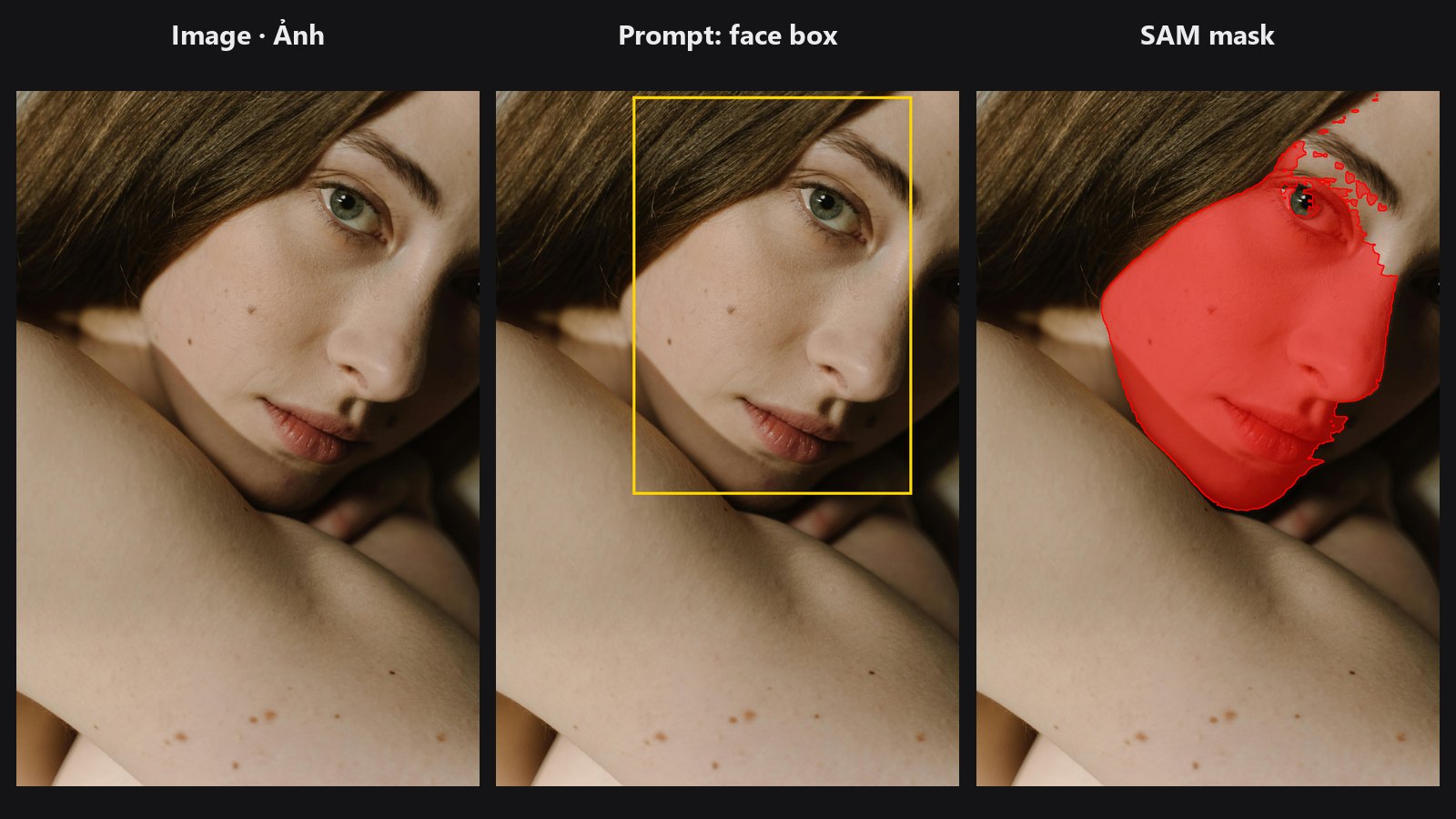
[[1200, 700]]. Add points that must stay out innegative_points_json. - A face box. Connect
bbox_jsonfrom Face Detect or Face Detect Lite. - A rough mask. Connect any MASK to
mask_hint. The node uses its bounding box and a point inside it.
If you give nothing, the node clicks the middle of the image.
Quick start
- Load Image → Mask: SAM One-Click.
- In
points_jsontype one point on your subject, such as[[0.5, 0.45]](see below for the two ways to write coordinates). - Connect
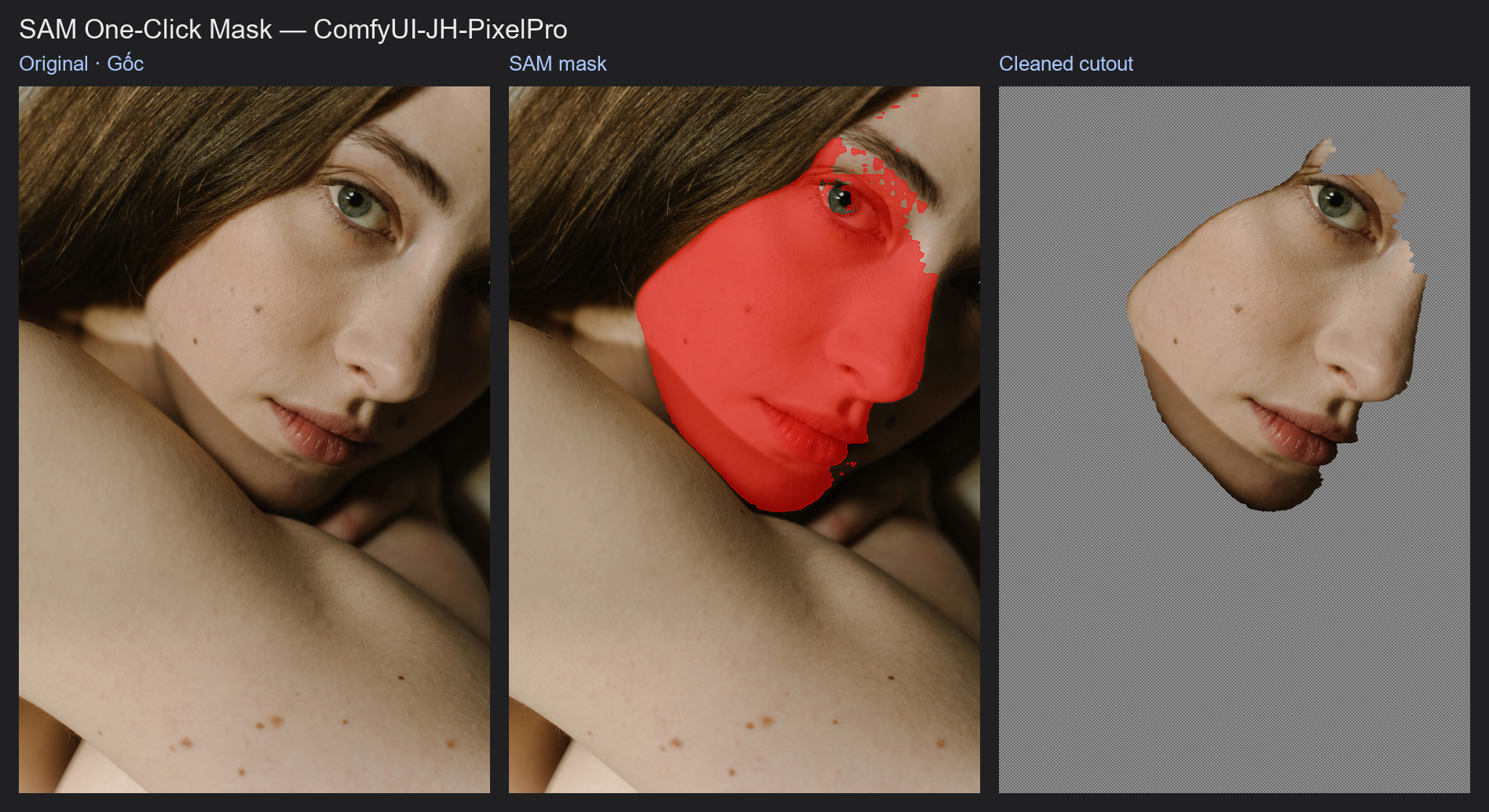
previewto a Preview Image node. The selection is tinted red with an outline. - Not right? Add a point on a missing part to
points_json, or a point on something that leaked in tonegative_points_json.
How to "click"
Points in pixels. [[x, y], [x, y]] with the origin at the top-left corner. Read the position from any image viewer. Valid values run from 0 to width − 1 and 0 to height − 1; a point on or past the edge (for example x equal to the width) is rejected.
Points as a fraction of the image. If every number is between 0 and 1 and at least one of them is a real fraction (such as 0.5), the node reads them as fractions: [[0.5, 0.4]] is the middle horizontally and 40 % down. This is handy because it works at any resolution. A list made only of 0 and 1, like [[1, 1]] or [[0, 0]], is read as pixels, because it cannot be told apart from pixel 1 or pixel 0.
Only negative points. Allowed, but SAM then has nothing to select and the result is unreliable. The node writes a warning to the log. Add a positive point, a box or a mask hint.
From a face. Connect bbox_json from Face Detect. The node reads the list of {x, y, w, h, ...} boxes. With a batch of images it picks the box whose batch_index matches each image. If the boxes carry no batch_index the first one is used.
From a rough mask. Draw a loose mask (even a rectangle) or take one from another node and connect it to mask_hint. SAM tightens it to the real edges.
You can combine them. A face box plus one point on the shoulder is a common mix.
Settings
| Setting | Default | What it does | Tip |
|---|---|---|---|
model |
vit_b |
Which Segment Anything model to use. | mobile_sam for speed, vit_h for the cleanest edges. |
points_json |
empty | Positive points on the object. | One to three points are usually enough. |
negative_points_json |
empty | Points on things that must not be selected. | Use it to cut a chair or a hand out of the mask. |
multimask |
on | SAM proposes 3 masks and the one with the best predicted score is kept. | Leave on for a single click. Turn off when you give a box or several points. |
mask_threshold |
0.0 | Cut-off for the final mask. | Below 0 grows the mask, above 0 shrinks it. Try ±1. |
bbox_json (optional) |
empty | Face box from Face Detect / Face Detect Lite. | Connect the output, do not type it. |
mask_hint (optional) |
none | A rough mask. | A box-shaped mask is enough. |
keep_model_loaded (optional) |
on | Keep the SAM model in VRAM between runs. | Turn off to free 0.4–7 GB right after the run; ComfyUI's Free memory button does not reach this model. |
Outputs
| Output | Type | Meaning |
|---|---|---|
mask |
MASK | The selection: 1 inside, 0 outside. One mask per image. |
score |
FLOAT | SAM's own quality estimate (about 0 to 1). With a batch, the average. Below 0.7 means you should add a point. |
preview |
IMAGE | The image with the mask tinted and outlined, for checking. |
Models
The files go in ComfyUI/models/sams/. A missing file is downloaded the first time you use that model.
| Model | File | Size | VRAM (about) | Notes |
|---|---|---|---|---|
vit_b |
sam_vit_b_01ec64.pth |
375 MB | 3 GB | Default. Good balance. |
mobile_sam |
mobile_sam.pt |
39 MB | 0.4 GB | Fastest, fine on CPU. Less precise on busy backgrounds. |
vit_l |
sam_vit_l_0b3195.pth |
1.2 GB | 5 GB (estimate) | Large download. |
vit_h |
sam_vit_h_4b8939.pth |
2.5 GB | 7 GB (estimate) | Large download. Best quality. |
Only one model stays loaded. Switching model frees the previous one from VRAM. The folder follows extra_model_paths.yaml when a sams entry exists there. Downloads have a timeout, are written to a .part file first, and vit_b and mobile_sam are checked against their SHA256 (no official hash is published for vit_l and vit_h, so only their size is checked).
Segment Anything and MobileSAM are released under the Apache-2.0 licence, which allows commercial use.
Tips from retouching
- A single click on a large subject can pick only a part (a face but not the body). Add a second positive point on the other part, or switch
multimaskoff and add a box. - For portraits a face box is a good start but it covers only the face. Add a point on the torso, or feed a rough body mask to
mask_hint. - SAM's edge is clean but binary. For hair and fur chain it into Sub-Pixel Mask Refiner, or build a Trimap and feed Alpha Matte for real soft hair.
- Use
previewwhile you place points, then takemaskfor the real work. - Very large images are resized inside the model (1024 px on the long side) and the mask is scaled back up. Fine hair detail will not come from SAM alone.
Under the hood
The node uses Kornia's VisualPrompter with the Sam model. The image (range 0 to 1) is resized so its long side is 1024, normalised and run through the image encoder once per image. Points go in as labelled keypoints (1 positive, 0 negative), a box as an xyxy box, in original pixel coordinates; Kornia scales them to the model frame.
The decoder returns up to 3 low-resolution logit maps with a predicted IoU each. The best by predicted IoU is upsampled to the original size, then cut at mask_threshold (a logit, 0 is SAM's default).
A mask hint adds its bounding box (unless bbox_json already gives one) and a positive point at the centroid, moved to the nearest mask pixel if the centroid falls outside the mask. With multimask on, candidate masks that cover more than 90 % of the image are skipped unless every candidate does. One model is cached at a time (the previous one is evicted on a change of model or device); it runs on CUDA when available, otherwise CPU. Each image in a batch is encoded separately.
Related nodes
- Face Detect Lite — gives the face box.
- Sub-Pixel Mask Refiner — cleans and smooths the SAM edge.
- Trimap Builder and Alpha Matte — soft hair and fur.
- Mask Preview — more preview modes.
Example workflow
SAM One-Click Mask example workflow feeds Face Detect Lite's box into SAM, then fills holes with Mask Cleanup and shows the cutout. It uses only core ComfyUI nodes and this pack. Copy workflows/sample_portrait.jpg into ComfyUI/input/.