Cull Score
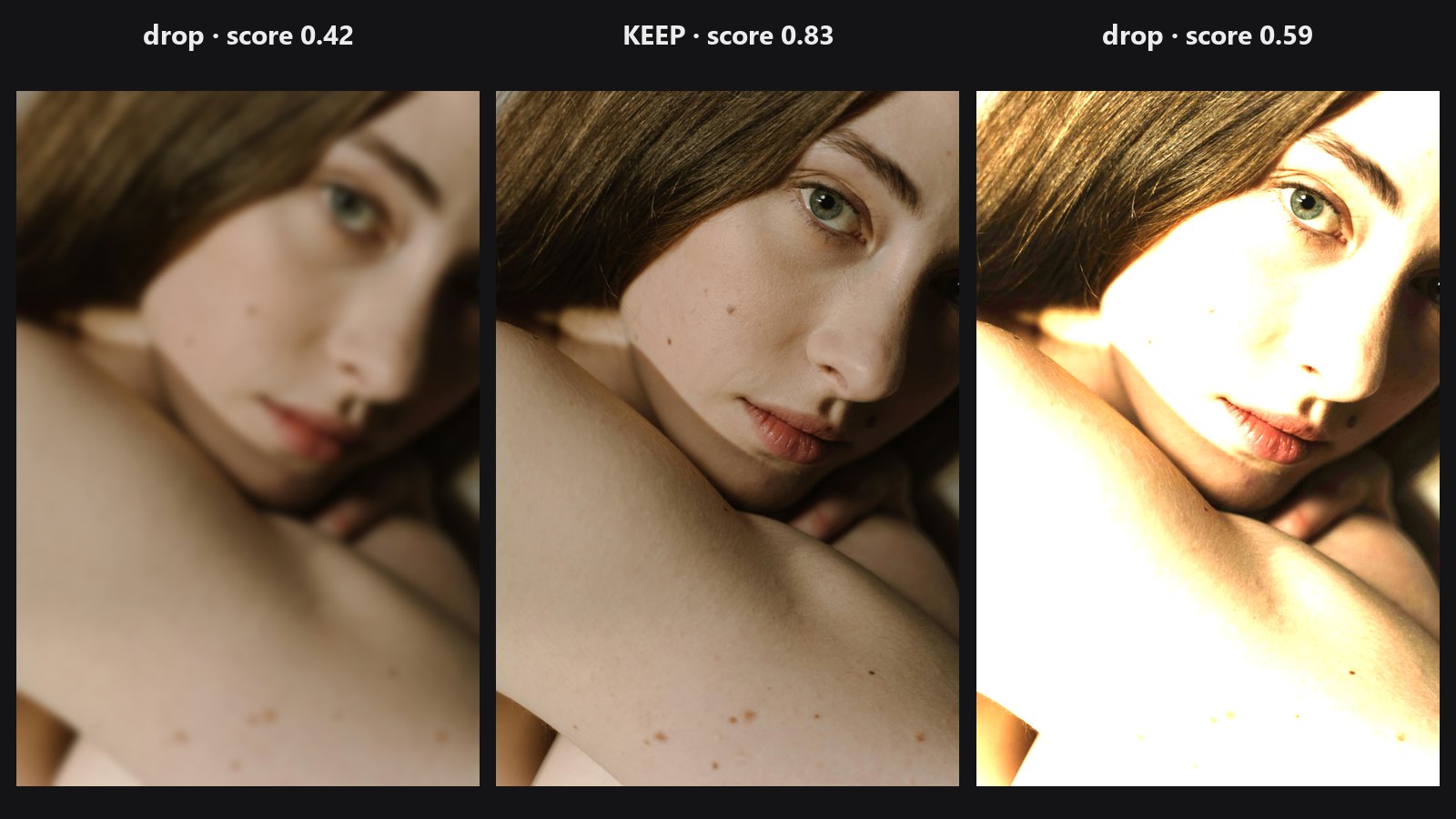
Drop in a whole shoot. The node scores every frame, skips blurry, badly exposed and near-duplicate shots, and hands back the keepers, best first.
| In ComfyUI | Add Node → ComfyUI-JH-PixelPro → qa → QA: Cull Score |
| Good for | Shortlisting a burst or a portrait session, removing blurry and blown-out frames, keeping one of several near-identical shots |
| Speed | Each photo is measured on a 1024 px copy, so the cost does not depend on the original size |
When to use it
After a shoot you often have dozens of near-identical frames. This node is a helper to shortlist them. It is not a judge of expression or composition, so look at the picks yourself before you deliver.
It checks four things: sharpness, exposure, closed eyes (when it finds faces) and duplicates. Sharpness is compared with the sharpest shot of the same scene, so a soft-looking portrait does not lose to a busy street photo that happens to be in the same batch.
Quick start
- Load a batch of same-size photos (for example with Load Image Batch).
- Connect it to QA: Cull Score.
- Send
selectedto Preview Image or Save Image. Readreportwith a text display node if you want the numbers. - Set
top_kto the number of photos you want, or leave it at 0 to keep every photo that passesmin_score.
Settings
| Setting | Default | What it does | Tip |
|---|---|---|---|
images |
A batch of photos, all the same size. | ||
top_k |
0 | 0 to 1000. Keep at most this many photos. 0 keeps every photo that passes. | Set it to 1 to get only the best frame. |
min_score |
0.5 | 0 to 1. Drops photos scoring below this. | Raise it for a stricter cull, lower it to keep more. |
check_eyes |
on | Lowers the score of photos where a face has closed eyes. Needs MediaPipe, and is skipped if it is missing. | Turn off for scenes without people. |
Outputs
| Output | What it is |
|---|---|
selected |
The kept photos, best first. It is never empty: if nothing passes, the best photo is returned. |
report |
JSON with one entry per input photo: index, score, sharpness, exposure, eyes_closed, faces, duplicate_of, keep and energy. |
kept |
How many photos were kept (INT). |
Tips from retouching
- The score is 0.6 for sharpness and 0.4 for exposure, minus 0.4 if eyes are closed. Use
reportto see why a frame was dropped. - In
report,duplicate_ofshows which frame a near-identical shot was folded into. Only the best of each group is kept. - Photos in one batch must be the same size. Resize first if your shoot mixes sizes.
- A blurred background with a sharp subject still counts as sharp. When faces are found, the face areas are measured instead.
- Send
selectedon to the retouching chain, for example Auto Tone, so you only edit the keepers. eyes_closedisnullin the report when the eye check is off or MediaPipe is not available.
Under the hood
Every photo is measured on a 1024 px copy. Sharpness is Laplacian energy per tile of an 8 by 8 grid, taking the 90th percentile, so a sharp subject on a soft background still scores high. When faces are found (YuNet), the face boxes are measured instead. The value goes on a log scale and is compared with the sharpest shot of the same scene, found by a similar difference hash. A shot 10 times blurrier than that scores 0 for the relative part.
Exposure is penalised for clipped highlights, crushed shadows and an average far from mid-grey. Closed eyes use the eye aspect ratio (Soukupova and Cech, 2016) from MediaPipe landmarks, with 0.18 as the limit.
Duplicates are grouped with a 64-bit difference hash. Photos within 10 bits of each other form one group and only the best is kept. Source: core/cull.py, wrapper nodes/cull_node.py.
Related nodes
- QA Image Diff: measure how much two images differ
- Face Detect Lite: the face finder that measures sharpness on faces
- Auto Tone: retouch the kept photos
- Contact Sheet: view many results side by side
Example workflow
Cull Score example workflow builds a small batch from the sample portrait (sharp, blurred and blown-out versions) and shows the selected photo and the report. Copy workflows/sample_portrait.jpg into ComfyUI/input/ (Pexels License).