LUT Preset
Pick a ready-made colour grade from a dropdown and dial it in. The looks are bundled .cube LUTs, so there is no file to find or load.
| In ComfyUI | Add Node → ComfyUI-JH-PixelPro → color → Color: LUT Preset |
| Good for | Quickly auditioning a look, a starting point for a grade, applying a consistent tone to a batch |
When to use it
A LUT (look-up table) is a saved colour grade: for every input colour it stores the output colour. Colourists use LUTs to carry one look across many shots and apps.
This node is the quick route. It ships six generic looks and applies them with the same engine as LUT Import. Use LUT Import instead when you have your own .cube file.
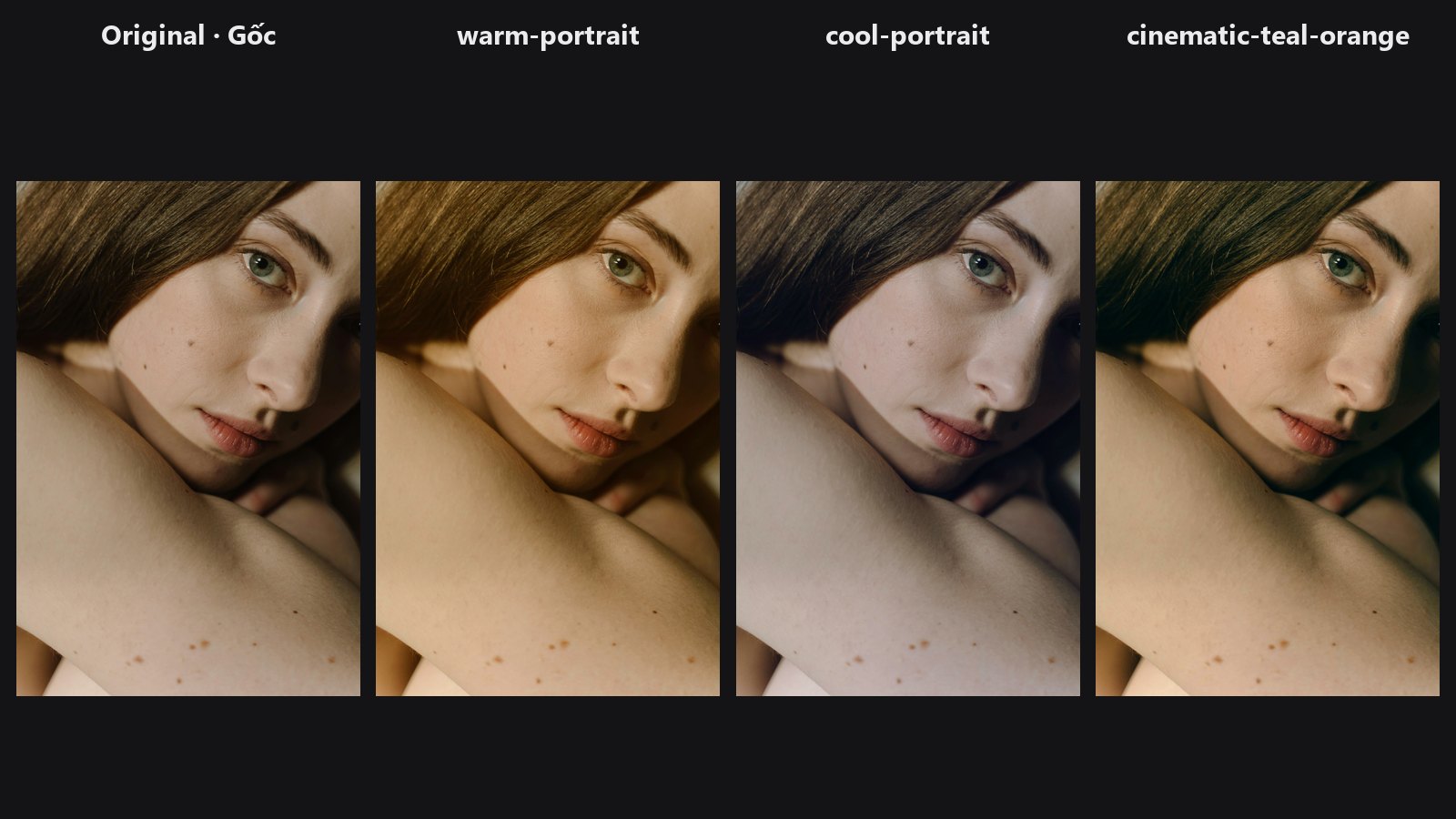
See the LUT Preset gallery for before and after pictures of every preset.
Quick start
- Connect Load Image → Color: LUT Preset → Preview Image.
- Choose a
preset. Start withwarm-portraitorcinematic-teal-orange. - Lower
intensityto 0.6 to 0.85 if the full look is too strong.
Settings
| Setting | Default | What it does | Tip |
|---|---|---|---|
preset |
neutral-identity |
The bundled look to apply (list below). | neutral-identity changes nothing; use it to check your wiring. |
intensity |
1.00 | Mix between original (0) and full look (1). | 0.6 to 0.85 is a natural dose for portraits. |
| Preset | Character |
|---|---|
neutral-identity |
No change; a baseline for comparison. |
warm-portrait |
Warmer, softer portrait direction. |
cool-portrait |
Cleaner, cooler cast. |
cinematic-teal-orange |
Cool shadows, warm highlights and skin tones. |
soft-pastel |
Lighter, lower-contrast colour. |
high-contrast |
Punchier separation. |
Output: image — the graded image.
Tips from retouching
- Grade after retouching. Skin work and frequency separation behave best on the neutral file.
- Use
intensityas your strength control. A look at 0.7 often reads more natural than at 1.0. - If a look pushes skin too far, try Look Select, which has a
protect_skinswitch. - Make your own look with the LUT workflow and bring it back with LUT Import.
Under the hood
The dropdown lists every .cube file in the pack's presets/ folder, so the list follows that folder. Each file is parsed as Adobe Cube 1.0 (all bundled files are 17-point cubes) and applied with trilinear interpolation through grid_sample, honouring any DOMAIN_MIN / DOMAIN_MAX header. intensity is a linear blend original * (1 - s) + lut * s. Colours outside the LUT domain are clamped to its edge, not extrapolated.
Related nodes
- LUT Import — apply your own
.cubefile. - LUT Export — turn a ComfyUI grade into a
.cube. - Look Select — JSON-driven looks with skin protection.
- Tone Curve — fine-tune contrast before or after the look.
Example workflow
LUT Preset example workflow. Copy workflows/sample_portrait.jpg into ComfyUI/input/ and choose it in Load Image.