Face Detect
Finds the face in your photo and reports where the eyes, nose and mouth corners are. It is the usual first step of any portrait edit that needs the face straightened or cropped.
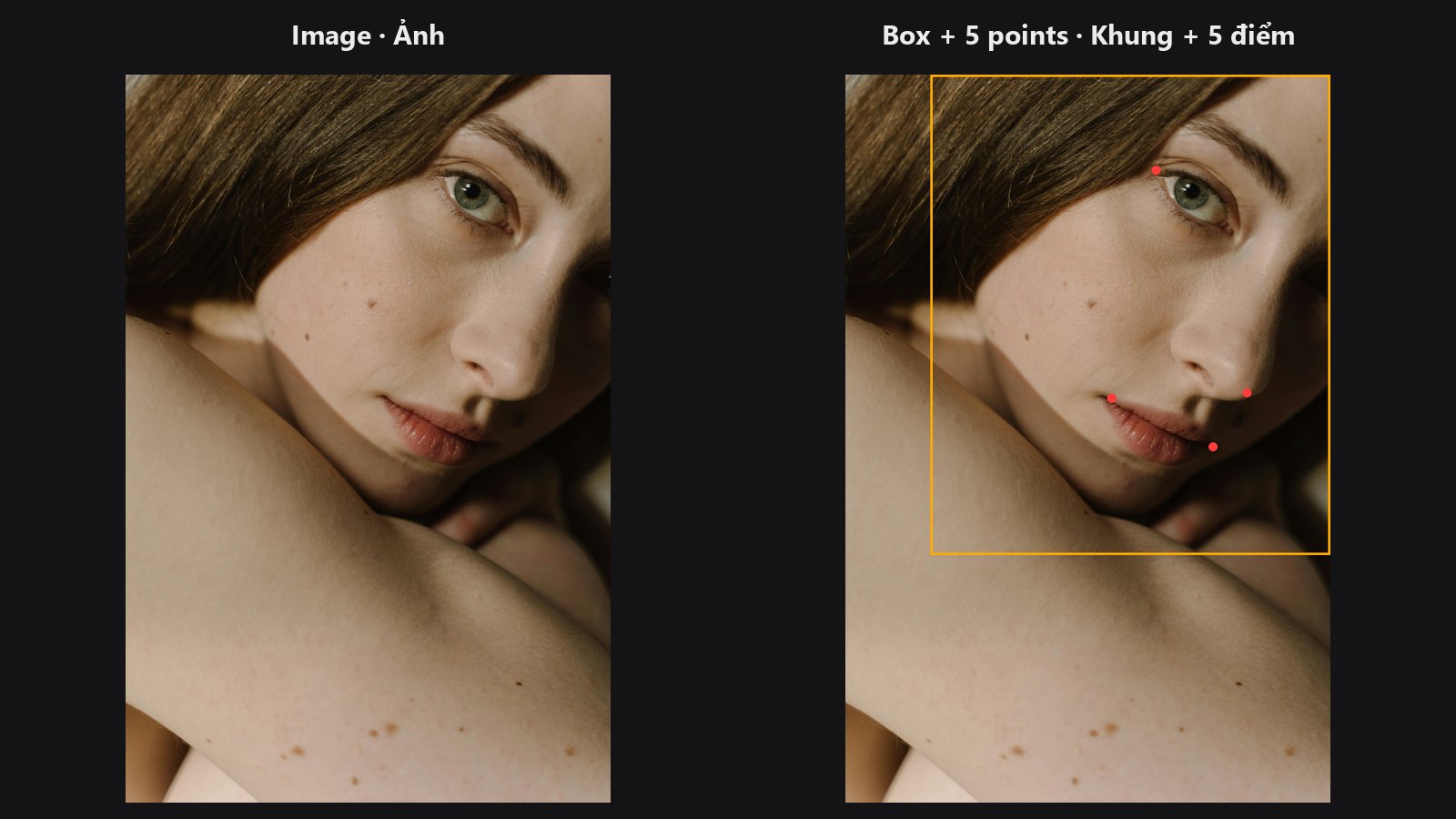
| In ComfyUI | Add Node → ComfyUI-JH-PixelPro → face → Face Detect (MediaPipe) |
| Good for | Feeding Facial Aligner; picking the biggest face in a group shot; counting faces |
| Speed | About 84 ms on CPU for the sample portrait (MediaPipe, desktop CPU) |
When to use it
Most face edits (an AI skin pass, a face swap, a detail enhance) work best on a face that is upright, centred and at a fixed size. To get there, the pack first needs to know where the face is. Face Detect answers with five points per face: left eye, right eye, nose tip, left mouth corner and right mouth corner. A landmark is simply a named point on the face.
Choose this node when you already use MediaPipe in your setup, or when you also plan to use Face Landmarks and want both to agree on the same face. If you only need fast detection and a face mask, try Face Detect Lite.
Quick start
- Add Load Image and connect
IMAGEto Face Detect (MediaPipe). - Leave
modeonsingle_largestfor a normal portrait. - Connect
landmarks_jsonto thelandmarksinput of Facial Aligner. - For a group photo, switch
modetomulti_top_kand raisemax_faces.
Settings
| Setting | Default | What it does | Tip |
|---|---|---|---|
mode |
single_largest |
single_largest returns the face with the biggest box. multi_top_k returns up to max_faces faces, biggest first. |
Portraits: keep the default. |
max_faces |
1 (1–10) |
Upper limit on returned faces. Ignored in single_largest. |
Crowd scenes: 5–10. |
confidence_threshold |
0.5 (0.1–0.95) |
How sure MediaPipe must be before a face counts. | Above about 0.85 it can miss normal portraits. Lower it if a face is missed. |
Outputs:
| Output | Type | Meaning |
|---|---|---|
landmarks_json |
STRING |
JSON list, one entry per face, in the order [L-eye, R-eye, nose-tip, L-mouth, R-mouth] (pixel [x, y]). |
bbox_json |
STRING |
JSON list of face boxes and extra info per face. |
face_count |
INT |
Number of faces returned. |
Tips from retouching
- For a single-subject portrait,
single_largestis the safe choice: it ignores a stray face in the background. - The
confvalue inbbox_jsonis the threshold you set, not a per-face score. To rank faces, use box size (multi_top_kalready sorts by it). - No face found? Lower
confidence_threshold, or check that the face is not tiny or heavily turned away. - Edits that need the full face mesh (reshaping, warping) use Face Landmarks instead. This node only gives five points.
Under the hood
The node wraps the MediaPipe FaceLandmarker (tasks API). The model file face_landmarker.task (about 5 MB) is downloaded once into ComfyUI/models/mediapipe/ the first time the node runs. The five points are taken from the 468-point mesh, so the eye points sit on the outer eye corners. The detector object is cached between runs. If mediapipe is missing, the node raises an error that tells you to install it. The code lives in core/face_detect.py.
Related nodes
- Face Detect Lite — faster GPU alternative without MediaPipe.
- Facial Aligner — takes
landmarks_jsonand straightens the face. - Face Landmarks — the dense 468-point version.
- Face category overview
Example workflow
Face Detect example workflow. Copy workflows/sample_portrait.jpg into ComfyUI/input/ first.