LUT Preset Gallery
N-34 JHPixelProLUTPreset ships six bundled generic Adobe Cube presets. The gallery below was generated from workflows/sample_portrait.jpg by invoking the actual N-34 node runtime and saving before/after previews under docs/assets/examples/lut-preset/.
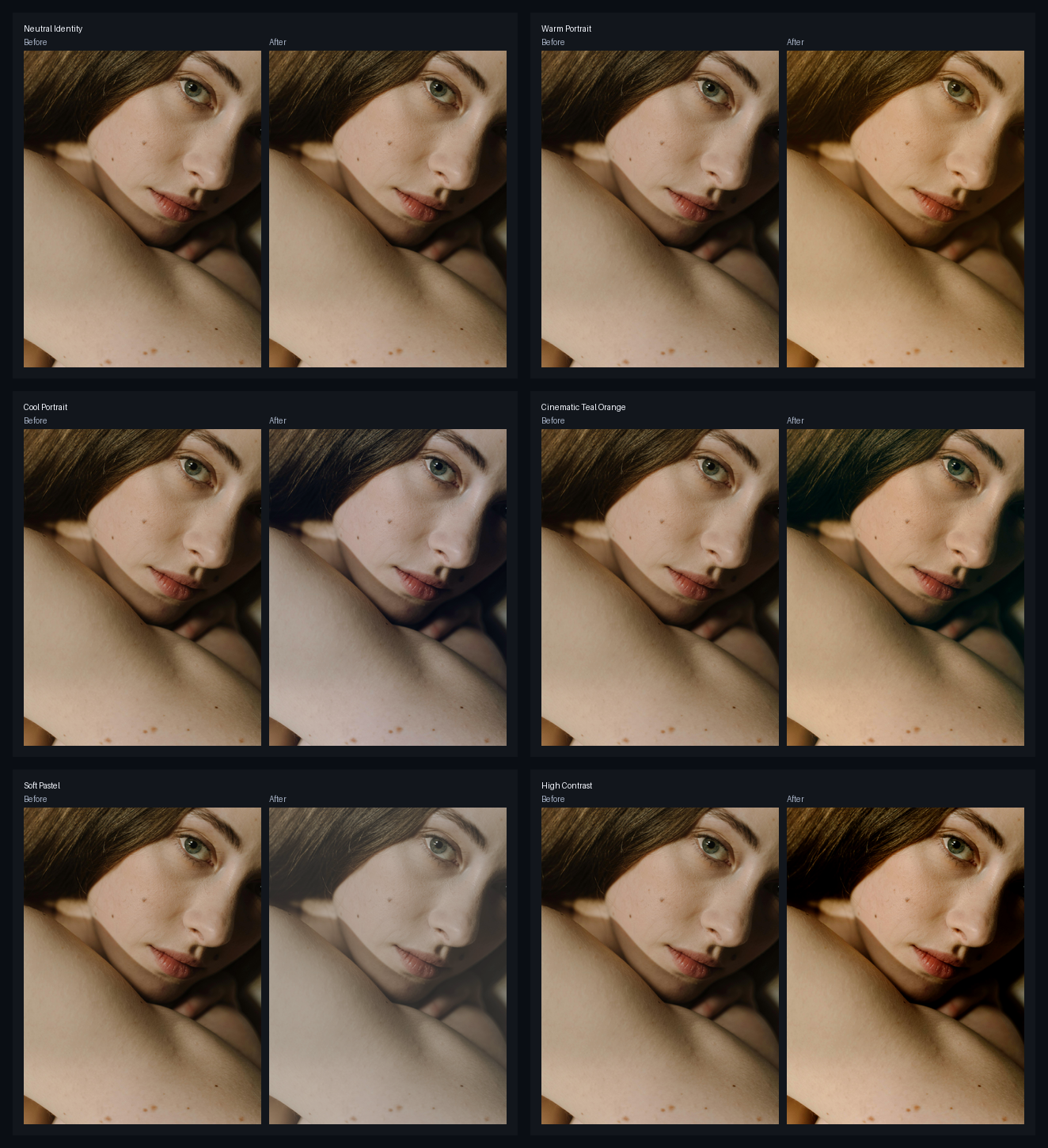
Preset intent
| Preset | Use when |
|---|---|
neutral-identity |
You want to verify wiring or compare against a no-op baseline. |
warm-portrait |
You want a warmer, softer portrait direction without building a full grade. |
cool-portrait |
You want a cleaner cool cast for editorial or product-adjacent portraits. |
cinematic-teal-orange |
You want a stronger split-tone look with cooler shadows and warmer skin-adjacent tones. |
soft-pastel |
You want lower-contrast, lighter color for gentle beauty or social previews. |
high-contrast |
You want punchier separation for quick review images or stronger grading starts. |
Workflow
Open the N-34 LUT Preset workflow, replace the LoadImage placeholder, and switch the preset dropdown. Use intensity below 1.0 when the full LUT is too strong.
For node details, see N-34 Preset Pack LUT.