Detail Mask
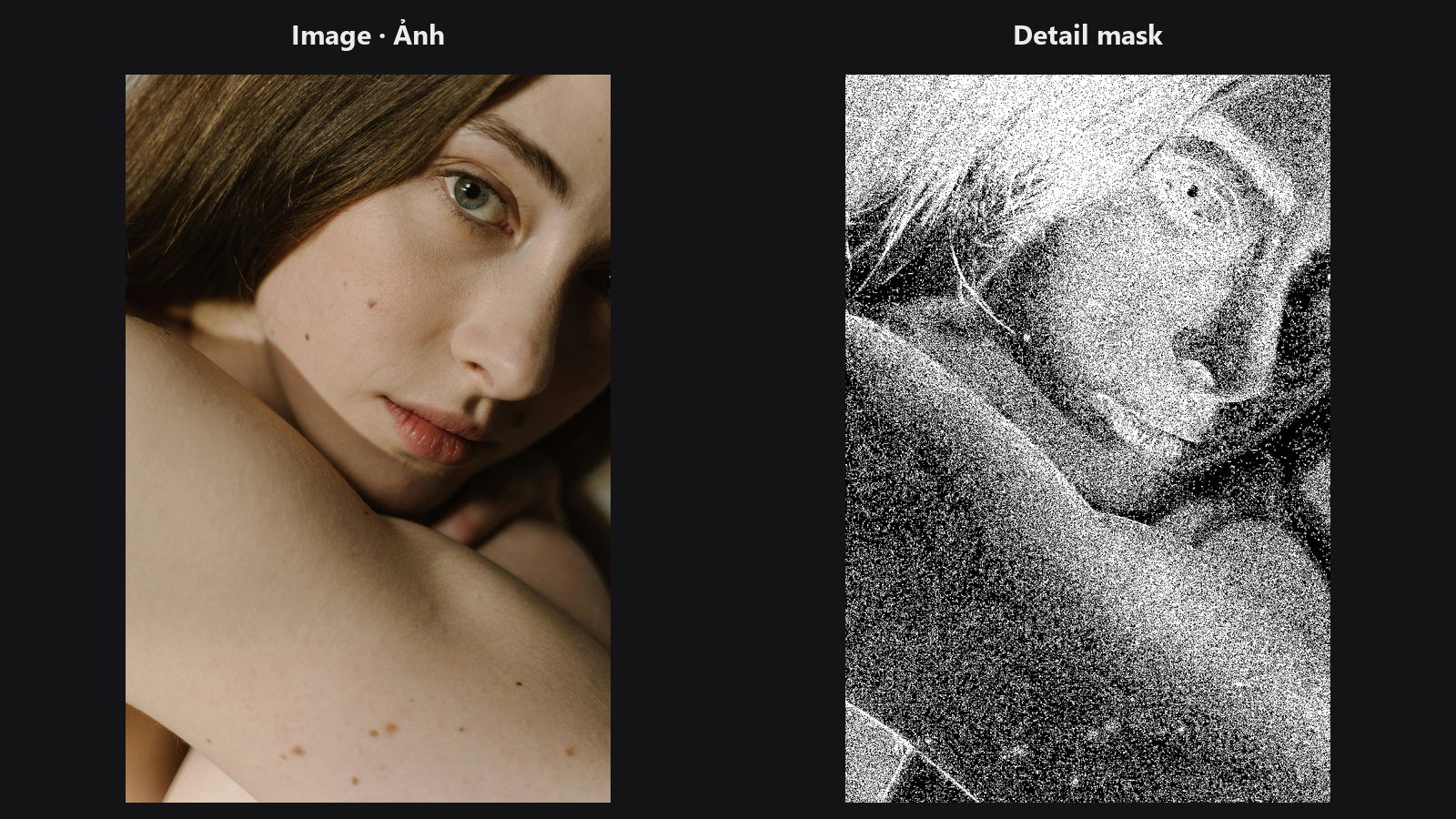
Finds where your photo has fine detail (eyelashes, hair, fabric weave, edges) and returns it as a mask. Use it to sharpen only where there is texture, or to keep smoothing away from detail.
| In ComfyUI | Add Node → ComfyUI-JH-PixelPro → mask → High-Frequency Detail Masker |
| Good for | Sharpening only textured areas, protecting detail during skin smoothing, building a mask for noise or grain work |
When to use it
In frequency terms, high-frequency content is the fine, fast-changing part of a photo: pores, hair strands, edges. Low-frequency content is the smooth colour and tone. This node measures how much fine detail each pixel has, then keeps the top share of the strongest pixels.
Typical uses:
- Gate Smart Sharpen so flat skin and sky do not get sharpened.
- Protect eyes, lashes and hair when you run Skin Smoother.
- Invert it to get the smooth areas only.
Quick start
- Connect your photo to
image. - Start with
kernel_typelaplacianandsensitivity0.4. - Preview the mask with Mask Preview. Raise
sensitivityto include more. - Use the mask as the gate in your sharpen or smooth step.
Settings
| Setting | Default | What it does | Tip |
|---|---|---|---|
kernel_type |
laplacian |
How detail is measured. laplacian finds fine detail in all directions; sobel favours edges; fs_gaussian uses the difference between the photo and a light blur (the high-pass of frequency separation). |
Start with laplacian. |
sensitivity |
0.5 | Share of pixels kept as detail. 0 gives an empty mask, 1 gives a full mask. | 0 to 1. For portraits, 0.3 to 0.6 is typical. |
threshold_mode |
relative_percentile |
relative_percentile adapts to each image, so the same sensitivity selects a similar share of pixels. absolute is scaled by the strongest detail in the image. |
Use the default. absolute can be thrown off by one bright speck. |
mask (optional) |
none | Limits the result to a region. The output is multiplied by it. | Use a face or subject mask. |
Output: mask_detail (MASK), values 0 or 1.
Tips from retouching
- The output is a hard on/off mask. Soften it with Mask Edge Smoother or a blur before using it as a blend mask.
- Detail is measured on the average of the colour channels (grey), so colour-only edges are weak.
- Noisy photos look "full of detail". Denoise first if the mask lights up on grain.
sensitivityis a share of the image, not a strength. A flat photo still returns the requested share, just on its relatively sharpest parts.
Under the hood
Luma is the mean of the RGB channels. High-pass options: laplacian (Kornia, 3x3, replicate border), sobel (Kornia, normalised gradient magnitude) or fs_gaussian (luma minus a 5x5, sigma 1 Gaussian blur). In relative_percentile mode the threshold is the per-image k-th value of the absolute high-pass so that about sensitivity of the pixels pass. In absolute mode the high-pass is divided by its per-image maximum and compared with 1 - sensitivity. Sensitivity 0 and 1 are shortcuts for an empty or full mask. Source: core/detail_masker.py.
Related nodes
- Smart Sharpen to sharpen through this mask
- Skin Smoother to smooth around the protected detail
- Frequency Separation for the low/high split behind
fs_gaussian - Mask Preview for viewing the result
Example workflow
Detail Mask example workflow. Copy workflows/sample_portrait.jpg into ComfyUI/input/ first.